emoX

Logo

Balance
— —
emoX
Auto-Buy Features Rewards & Feed Why emoX How It Works About us Team Technical Whitepaper Login with Telegram
emoX

Quality calls.
Bought for you. Managed for you.

Multi-lane auto-buy for Verified, Mooner, CTO and dev-wallet launches — each with its own size, optional dip-wait, and strategy. After entry, stop loss, profit levels, partials and moonbag run without you babysitting charts.

Login with Telegram →

Demo Mode & Real SOL Mode available · Risk-free to start

65% Verified win rate · ~1.5× ATH
67% Mooner win rate · ~1.5× ATH
4 Auto-buy lanes live
4–6ms Stream latency

Illustrative track record on historical internal call stats (ATH vs call MC). Not financial advice; past performance ≠ future results.

Inside emoX

The live dashboard you trade on

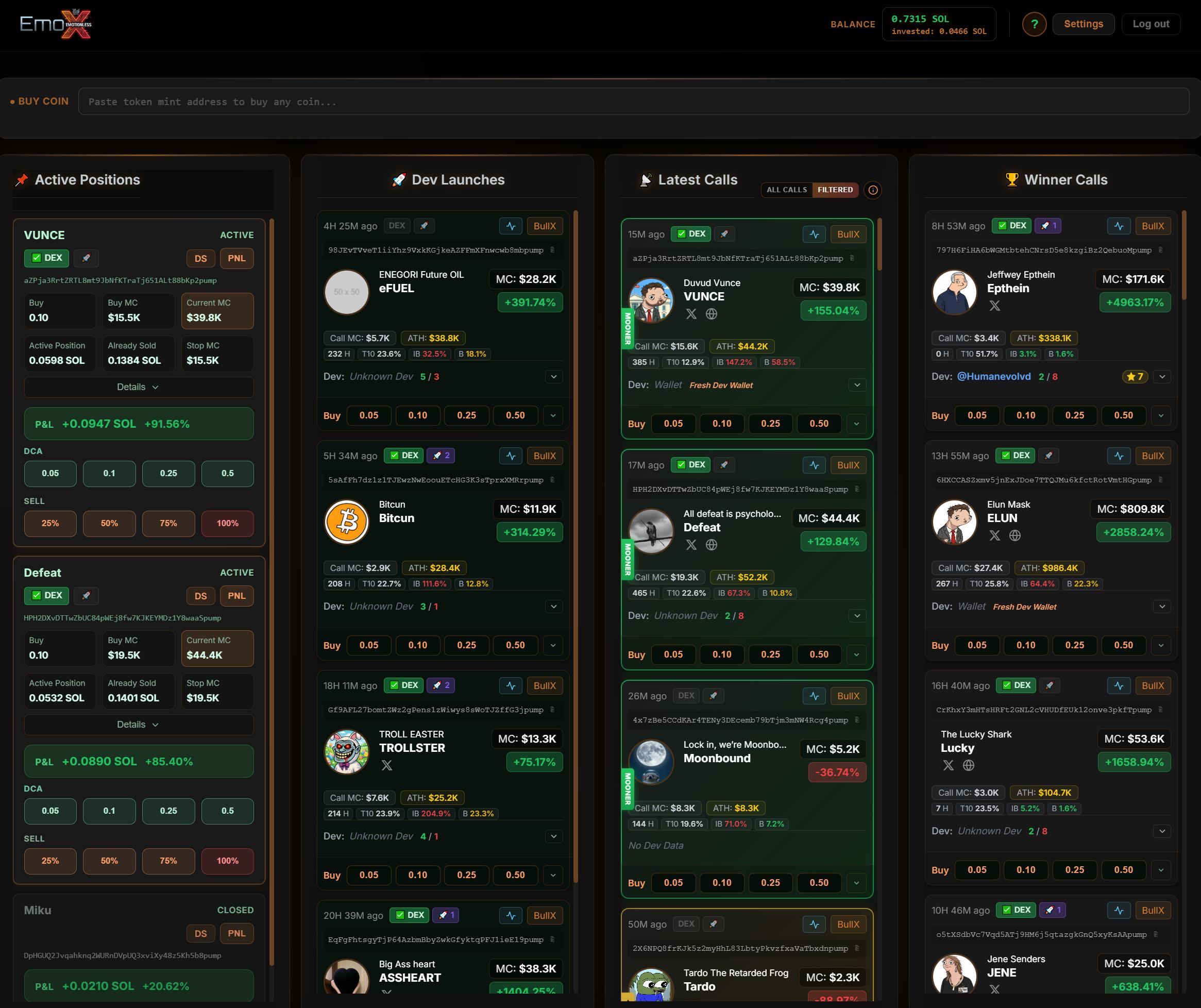
Active positions with DCA & sell controls, Dev Launches, Latest Calls (Filtered / All), and Winner Calls — balance header, mint search, and one-tap buy presets on every card. Screenshot from the real product UI.

emoX · calls workspace
Tap or click to enlarge Representative view; live data after login.
Auto-Buy

Four ways to never miss the entry

Turn each signal type on or off, set SOL size, optional wait-for-dip, and even a dedicated strategy per lane — same execution stack as manual buys.

Verified Algorithm-filtered

Our flagship quality lane — on-chain metrics, scoring, and ML-assisted filtering.

~65%win rate*
~+300%avg ATH P&L*
Mooner High-momentum profile

Coins that match our mooner profile (DEX profile + early-verified paths) — same auto-buy UX as verified.

~67%win rate*
~+183%avg ATH P&L*
CTO DexScreener CTO

Snipes fresh narrative when a community takeover (CTO) update hits DexScreener — automated entries on a separate lane.

Lanelive · own size & strategy
Dev snipe Your wallets

Paste the dev wallets you trust — the bot buys the instant they launch a new coin on pump.fun (no dip wait on this lane).

Instantper-wallet list · you control risk
◇

More auto-buy categories

Additional signal lanes are in active development — same per-lane settings model, wired into the same low-latency stack.

* Win rate = share of calls reaching ≥1.5× call MC at ATH; avg ATH P&L = mean % gain from call MC to ATH on historical cohorts. Figures are illustrative and can change as markets shift.

The Problem

You're not losing because of the market.
You're losing because you're human.

Every trader knows the feeling. Emotions are the biggest enemy in memecoin trading — and most people never fix it.

Without the Bot

Emotions destroy profits

  • ✕ Rage rebuy after selling too early
  • ✕ Holding bags — "it might still pump"
  • ✕ No exit plan when it counts
  • ✕ FOMO into tops, panic sell at lows
  • ✕ Missing the pump while you sleep
  • ✕ Too slow on CTO updates & dev launches
With emoX Bot

Strategy executes itself

  • ✓ Stop loss locked in before entry
  • ✓ Profit levels trigger automatically
  • ✓ Trailing stop locks in every gain
  • ✓ Partial sells on the way up
  • ✓ Bot runs 24/7 — you sleep easy
  • ✓ Auto-buy fires on verified, mooner, CTO & your dev list
Execution + intel

Autopilot entries, disciplined exits

emoX is built so signals → entries → risk management happen in one system: auto-buy gets you in; your strategy enforces the plan on every position.

🤖

Per-lane auto-buy

Verified, Mooner, CTO and dev-snipe each toggle independently — SOL amount, optional dip %, and optional custom strategy per category.

📦

Initial & live bundles

See bundler share at call time and how it evolves on the card — a huge filter when you’re deciding size or whether to skip.

🛡️

Stop, stairs & partials

Stop loss, staged profit levels that ratchet your floor, and partial sells + moonbag — all enforced after every fill, manual or auto.

⚡

4–6ms datastream

Low-latency feed and snappy execution paths so you’re not last in line when a call or CTO update drops.

🔍

Verified + Mooner quality layers

In-house screening, scoring, and profile filters — not a firehose of every launch. Built to cut noise, not add another tab.

🎯

Dev intel & CTO feed

Dev history, bonding context, and CTO-tagged calls in the same dashboard you auto-buy from — narrative and sniper lanes in one place.

Rewards & alpha

Trade smarter — earn & spot more

Fee cashback, a post-launch emoX token airdrop tied to credited rewards, referrals for builders, and CTO-tagged calls — all in the same live feed you trade from.

💸

Fee cashback

Earn cashback on your trading fees over time. It accrues on your account and you can pay it out to your emoX trading wallet once you hit the minimum — straight from settings.

🤝

Referral program

Invite friends with your personal link. When they trade, you can earn a share of platform fees — track earnings and payouts from the Referral tab after login.

🪂

Post-launch airdrop

emoX tokens after launch: your credited fee cashback on real SOL trades maps into an allocation (for example 1M emoX per 1 SOL credited, up to a 5M cap). Use the estimator below to see an illustrative token count from on-chain activity.

🔄

CTO calls

Community takeovers and handoffs surface as CTO-tagged calls in the dashboard — same one-click bot flow as verified plays, so you don’t miss narrative-driven setups.

Calculate rewards, cashback & airdrop preview

Paste any Solana trading wallet — we scan the last 30 days of on-chain activity and show an illustrative cashback, referral, and emoX airdrop token preview (1% per-transaction model). No login, no private key.

Rewards estimator

Results are illustrative; real rewards apply to trades on emoX only.

On-chain lookup

Scanning your wallet…

Fetching the last 30 days of transactions…

Last 30 days (detected activity)
Bought tokens
—
Sol Spent
—
Sol Received
—
Generated Volume
—
Your cashback (30 days)
—
25% of emoX’s 1% per-transaction fees on your activity — modeled as 1% × (Sol spent + Sol received across your transactions) × 25%.
Referral scenario (30 days)
—
—
Post-launch emoX airdrop (illustrative)
emoX tokens from your 30-day cashback estimate
—
—
Maps 1M emoX per 1 SOL of credited fee cashback (real SOL trades on emoX), up to 5M emoX total. USD line uses the same reference as in-app settings (~$2k per 1M tokens at $1M mcap). Not financial advice; terms and timing can change.
If that referral activity repeated
12 months (illustrative)
—
24 months (illustrative)
—
Airdrop if cashback pace continued (5M cap)
12 months · emoX tokens
—
24 months · emoX tokens
—

Referral “lifetime” multiplies the 30-day referral estimate × 12 / × 24. Airdrop row uses your 30-day cashback × 12 / × 24, each capped at the 5M emoX program limit — illustrative only.

Open full rewards page for the complete breakdown.

Why emoX

Built for signal → execution

emoX is built for signal → execution: multi-lane auto-buy, bundle transparency on cards, and one playbook across web + Telegram.

What matters emoX.bot BullX Trojan
Multi-lane auto-buy (verified / mooner / CTO / dev list) ✓ Four live lanes, per-lane strategy & sizing ~ Varies; rarely one unified model ✕ Not a core bundled story
Initial vs current bundler % on calls ✓ Shown for sizing & skip decisions ~ Partial / situational ✕ Not a headline feature
Full lifecycle automation (stops, stairs, partials) ✓ Core product path ~ Possible, heavier setup ~ TG-centric, less web strategy depth
In-house verified + mooner signals ✓ Quality-first lanes + auto-buy ~ Broader visibility ✕ No equivalent lane stack
Rug filtering / ML-assisted quality ✓ ML + signal filters on feeds ✕ No same quality-first positioning ✕ No same quality-first positioning
24h demo mode (Demo SOL) ✓ Test auto-buy flow risk-free ✕ No direct equivalent ✕ No direct equivalent
DEX Paid + DEX Boost visibility ✓ Surfaced fast in workflow ✕ Not a prominent core signal in web flow ✕ Not a core Telegram signal
Developer intelligence (history, bonding, CTO) ✓ Structured in-product ~ Less central to UX ✕ Not comparable depth
Web desk + Telegram, same account ✓ One playbook, two screens ~ Hybrid available ✕ Primarily Telegram-centric
Trading speed (buy/sell) = Competitive = Competitive = Competitive

Multi-lane auto-buy

emoX.bot: ✓ Verified, Mooner, CTO, dev list — per-lane strategy

BullX: ~ Varies

Trojan: ✕ Not a bundled core story

Initial & live bundle %

emoX.bot: ✓ On-card for decisions

BullX: ~ Partial

Trojan: ✕ Not highlighted

Lifecycle automation

emoX.bot: ✓ Stops, stairs, partials — core path

BullX: ~ More setup

Trojan: ~ TG-first

Verified + Mooner lanes

emoX.bot: ✓ In-house + auto-buy

BullX: ~ Broader feed

Trojan: ✕ No equivalent stack

24h Demo SOL

emoX.bot: ✓ Full flow including auto-buy

BullX: ✕ No direct equivalent

Trojan: ✕ No direct equivalent

Web + Telegram

emoX.bot: ✓ Same account

BullX: ~ Hybrid

Trojan: ✕ TG-centric

Trust note: Meme-coin markets are high-risk. Competitor cells are good-faith summaries — verify in their live apps. emoX focuses on execution and filtering, not zero risk.

Simple

From setup to fully automated in 3 steps

No complexity. No constant monitoring. Set once, trade forever.

1

Strategy + auto-buy

Set your default strategy (stop, profit stairs, partials, fees). Then enable Verified, Mooner, CTO and/or dev snipe with sizes and optional dip rules.

2

Bot watches & buys

Matching calls hit your rules — the bot opens positions automatically. You can still one-click buy manually on any card anytime.

3

Exits on autopilot

Every open position follows your strategy: stops move up, partials fire, moonbag logic applies — no 3 a.m. discipline required.

Roadmap

Building the future of trading

Our Journey

Live now

  • Demo mode — virtual SOL, full product surface
  • Real SOL trading — same strategies & feeds
  • Strategy engine — presets, stops, stairs, partials, moonbag
  • Auto-buy · Verified — flagship lane + stats
  • Auto-buy · Mooner — profile-matched mooner calls
  • Auto-buy · CTO — DexScreener CTO narrative lane
  • Auto-buy · Dev snipe — your wallet list, instant launch buys
  • Bundle metrics — initial & current bundler % on cards
  • Cashback + referral — fee rewards in-app
  • Telegram bot — same account as the web desk
  • ML-assisted signals — scoring & filters on feeds

Coming next

  • More auto-buy lanes — new signal categories, same model
  • Weekly toplists — compete for SOL prizes
  • $emoX launch — pump.fun, community ownership
  • Airdrop program — high-activity & early users
  • Deeper ML scoring — continuous model upgrades
Team

About emoX

Why we built an emotionless execution layer for memecoin traders — and what we learned along the way.

emoX was born from a simple obsession: fully automated memecoin trading — no panic entries, no revenge holds, no “just one more candle.”

For over two years I’ve been shipping tools that help traders cut through noise and surface real opportunity. With big data and machine learning, we’ve refined methods to separate promising setups from the long tail of junk — but the hardest problem was never the model.

It was human nature. You stack green days and get sloppy; you bleed red and emotions hijack the plan. That’s how edges evaporate — not because the market changed, but because you did.

Traders like Cupsey stay dangerous because they execute the same disciplined playbook on repeat. Consistency beats genius. That’s the standard we built toward.

emoX is the product of that mindset: signals, auto-buy, and exits encoded in one system — so you’re not renegotiating the plan every session.

We’re here to execute — so you don’t have to negotiate with fear or greed at 3 a.m.

Jay — emoX
Jay
Founder & builder
Message Jay on Telegram
Squad

The team

Builders, degens, and narrative machines — short intros, maximum send.

Silvester

Silvester

Co-Developer

On-chain bloodhound — follows wallets until the story breaks. Ships weird-good features between coffees. If you’re stuck, he’s probably already three commits ahead.

Dago

Dago

Financial Board

Our live-fire QA wallet: will yeet 10 SOL on a fresh ticker just to prove the rails hold. If it survives Dago, production nods in respect.

Skiddy

Skiddy

Marketing

Idea machine with a Rolodex of degens. Bullish isn’t a mood — it’s the default. When Skiddy’s in the chat, narratives actually move.

Coens

Coens

Marketing

Raid general — retweets like art, shows up when it counts. Ego on zero, volume on vertical. Makes a 200-person chat feel like a stadium.

RRCryptoSol

RRCryptoSol

Marketing / PR

CT rhythm section — threads land crisp, Spaces hit on beat. Trends don’t surprise RR; RR heard the rumble before the timeline did.

$ emox --status
✓ System operational
✓ Solana connection established
✓ Demo mode available
✓ Live SOL trading + auto-buy lanes
✓ Verified · Mooner · CTO · Dev snipe
○ More signal lanes in build
$ emox --login telegram
Ready to trade emotionless...
Login with Telegram →

Free demo mode · No credit card · No risk

© 2026 emoX.bot — Trade emotionless · Auto-buy optional

emoX dashboard: four columns showing Active Positions, Dev Launches, Latest Calls with Mooner tags, and Winner Calls with market cap and P&L.
● BUY COIN
Buy
Wait for Dip
Wait for MC
$

📌 Active Positions

🚀 Dev Launches

No dev launches yet

📡 Latest Calls

No calls available

🏆 Winner Calls

No calls available

Made by the emoX team · Trade emotionless.

— —
Buy

Settings

🔒

Your Wallet

Deposit SOL to this wallet to start trading. Your wallet address:

—
Balance —
Invested —

Fee cashback

—

Total credited —
Paid out —
Available —
emoX

Post-launch airdrop

We more than double your cashback upside: trade in Real SOL and the higher your total credited fee cashback grows, the larger your emoX token allocation after launch. Launch is anticipated in 4–8 weeks.

  • 1 SOL of total credited fee cashback → 1,000,000 emoX tokens
  • Hard cap: 5,000,000 tokens (after 5 SOL credited, allocation stays at the cap)

Reference (our target band, often higher): at a $1M market cap, 1M tokens ≈ $2,000 USD.

Your total credited fee cashback —
Your emoX allocation (capped) —
Illustrative value at $1M mcap —

Updates live from your credited fees while this panel is open. Not financial advice; launch timing and terms may change.

🔗 Referral Program

Trading Mode
Real mode is active.

Please show this key only if you are the only person viewing it right now. Store it as securely as possible.

⚡

Buy Button Presets SOL

Four quick-buy amounts shown on every coin card. Click to buy instantly.

🛡

Trading Strategy

🧠 Load Strategy Preset
Your Current Strategy:
Custom

Bot exits the trade when price drops this % from entry.

Profit Levels At X multiple: move stop to Y
Hit X multiple Move stop to X
📈

Partial Sells

At X multiple: sell this % of remaining position
Hit X multiple Sell %
🔄

Auto DCA

Automatically buys more when the price drops to your configured loss level — only while still on the initial stop loss (no profit level hit yet). After each DCA, entry price is recalculated and the strategy resets.

DCA Levels At X% loss from entry: buy Y% of initial position
Trigger at % loss Buy % of initial

Levels execute in order. After each DCA, the average entry recalculates and the strategy (stop loss, profit levels, partials) restarts from the new entry.

⚙

Execution

Slippage
Buy Speed
Sell Speed
⚡
Priority Fee vs. Jito Tip

Two ways to speed up your transactions. When Jito Tip is set, it overrides the Priority Fee — Jito is the faster option because it tips validators directly for guaranteed block inclusion (~90% of Solana validators run Jito). Priority Fee is the standard fallback used when Jito Tip is 0.

Priority Fee: Standard Solana fee market. Used when Jito Tip is 0. Recommended: 0.0005–0.002 SOL Jito Tip: Direct validator bribe for faster inclusion. Overrides Priority Fee when set. You only pay if your TX lands. Recommended: 0.001–0.005 SOL For sniping & auto-buy: Set Jito Tip to 0.003–0.005 SOL for maximum speed For sells: Less time-critical — Priority Fee 0.001 SOL is usually enough. Set Jito Tip to 0 to save fees.
📊

Strategy Back-Test

Back-test any strategy against all past verified calls. The simulation replays each coin's price history from the moment it was called and applies the strategy rules (profit levels, partial sells, stop loss) as if you had traded it live. Results are approximate — real execution involves buy/sell delay, slippage and network latency, so actual performance will differ.

Strategy Parameters (click to edit) ▶
Profit Levels
Partial Sells (Take Profit)
Coin Date Entry MC Peak PnL % PnL SOL Return Exit
⚡

Auto-buy

Each type can use its own Strategy (stop, profit levels, partials). "Default" = your current Strategy tab settings. Buys only run in Real SOL mode.

Verified calls

Use 0 for an immediate buy. Optional.

Mooner coins

If set to 0, the verified-call amount is used.

Use 0 for an immediate buy. Optional.

CTO coins

If set to 0, the verified-call amount is used.

Use 0 for an immediate buy (same speed path as verified). Optional.

Consolidated Dev Launches

Only buy if the dev's last 10 launches have at least this bonding rate. E.g. 25 = 25%.

If set to 0, the verified-call amount is used.

Use 0 for an immediate buy. Optional.

Dev wallet snipe

If set to 0, the verified-call amount is used.

📈

Trading History

All your trades in the current mode, newest first.

Loading…
Same account · parallel lane

Telegram trading bot

Run the web dashboard and Telegram side by side — two screens, one playbook. Snipe and manage from your phone while charts are open; you’re never stuck when you’re away from the desk.

Open in Telegram
⚡

Instant buy

If on, the bot buys immediately after you paste a mint, using the preset you select below. If off, you pick the size from inline buttons each time.

◫

Instant buy uses this preset

Same four amounts as Buy presets in Settings. Edit amounts there; choose which slot the bot uses here.

How to use emoX.bot

Quickstart Auto-Buy Dashboard Coin Box Buy Options Positions Settings Demo vs Real Glossary

⚡ Quickstart

emoX.bot is built for pump.fun–style memecoins and live calls: trade manually from the feed or use Auto-Buy on separate lanes (Verified, Mooner, CTO, Dev wallet snipe). After any entry, your Strategy runs the trade — stop loss, profit ladder, partials, moonbag — so you are not chained to charts.

1

Log in via Telegram

Click the login button and confirm in Telegram. A dedicated SOL wallet is created automatically for your account.

2

Set your strategy

Open Settings → Strategy and configure stop loss, profit levels, partial sells, slippage and priority / Jito fees — or load a preset. Use the Simulate Strategies sub-tab to back-test on historical verified calls; after you change parameters, click Run Simulation again to re-simulate with the updated rules.

3

Auto-Buy or buy manually

Turn on lanes under Settings → Auto-buy: per-lane buy size, optional wait for dip, and which strategy preset to use. Auto-buy executes in Real SOL mode only. Or leave Auto-Buy off and tap buy preset buttons on call cards or the top Buy Coin bar — with the same optional dip / MC waits, then full automation after the fill.

Tip: Start in Demo Mode (10 virtual SOL) to practice risk-free, then switch to Real Mode in Settings → Wallet when you are ready.

⚡ Auto-Buy lanes

Auto-Buy submits buys automatically when a new call matches a lane you enabled. Each lane can use its own buy size, optional wait for dip %, and strategy preset (stops, profit levels, partials). Default in the strategy dropdown means “use whatever is saved on the main Strategy tab.” Execution is Real SOL only — Demo mode is for manual practice.

Verified calls

High-signal algorithmic calls. Matches the golden Verified ribbon in the feed. Your main lane for quality-filtered entries.

Mooner coins

Calls that qualify as Mooner (moon icon / tag in the feed). Optional separate size and dip; if amount is 0, the Verified auto-buy size is reused.

CTO coins

Community Takeover calls surfaced in the feed. CTO state is shown on cards in real time where available. Same pattern: own size, dip, strategy — or 0 SOL to inherit the Verified amount.

Dev wallet snipe

Snipe new pump.fun creates from wallet addresses you list (one per line). No dip wait on this path; uses your chosen strategy after entry.

After Auto-Buy fills

Every auto-bought position is managed like a manual buy: Strategy rules apply (stop loss, profit steps, partial sells, moonbag). Pending dip orders show under Active Positions as Pending until the target is hit or you skip / cancel.

Note: Auto-Buy is optional. You can run the bot with manual presets only. Always size responsibly — memecoins can go to zero.

📊 Dashboard Overview

The workspace is split into four columns (swipeable tabs on mobile). Cards show live market cap, ATH, DEX / boost status, and expanded dev stats where available — including Verified, Mooner, and CTO tags so you see which lane a call belongs to.

Active Positions

Open and pending trades: live P&L, stop / profit state, sell, skip, cancel. Badges show how a position was opened (e.g. manual vs auto lane) where applicable.

Dev Launches

Fresh launches from developers with a bonding / track-record filter — quality-gated dev activity, aligned with dev-snipe style workflows.

Latest Calls

New calls as the algorithm detects them, sorted by time. Use Filtered vs All views where offered. Each card carries category context (Verified, Mooner, CTO), live MC, DEX and boost badges, and expandable dev intel.

Winner Calls

Top performers by profit since call / entry — quick read on what is working right now in the feed.

Buy Coin Bar

The search bar at the top of the dashboard lets you buy any token by Mint address — not just calls from the feed. Paste a token mint, see the live preview (name, symbol, current MC), and buy with your presets. Full buy options (Dip, MC target) are available here too.

Balance

Your current wallet balance is shown in the header. In Demo mode this is your virtual balance (starts at 10 SOL). In Real mode it reflects your actual SOL balance on-chain.

Mobile

On mobile, the four columns become swipeable tabs. Tap the tab bar at the top to switch between Active Positions, Dev Launches, Latest Calls and Winner Calls.

💳 The Coin Box

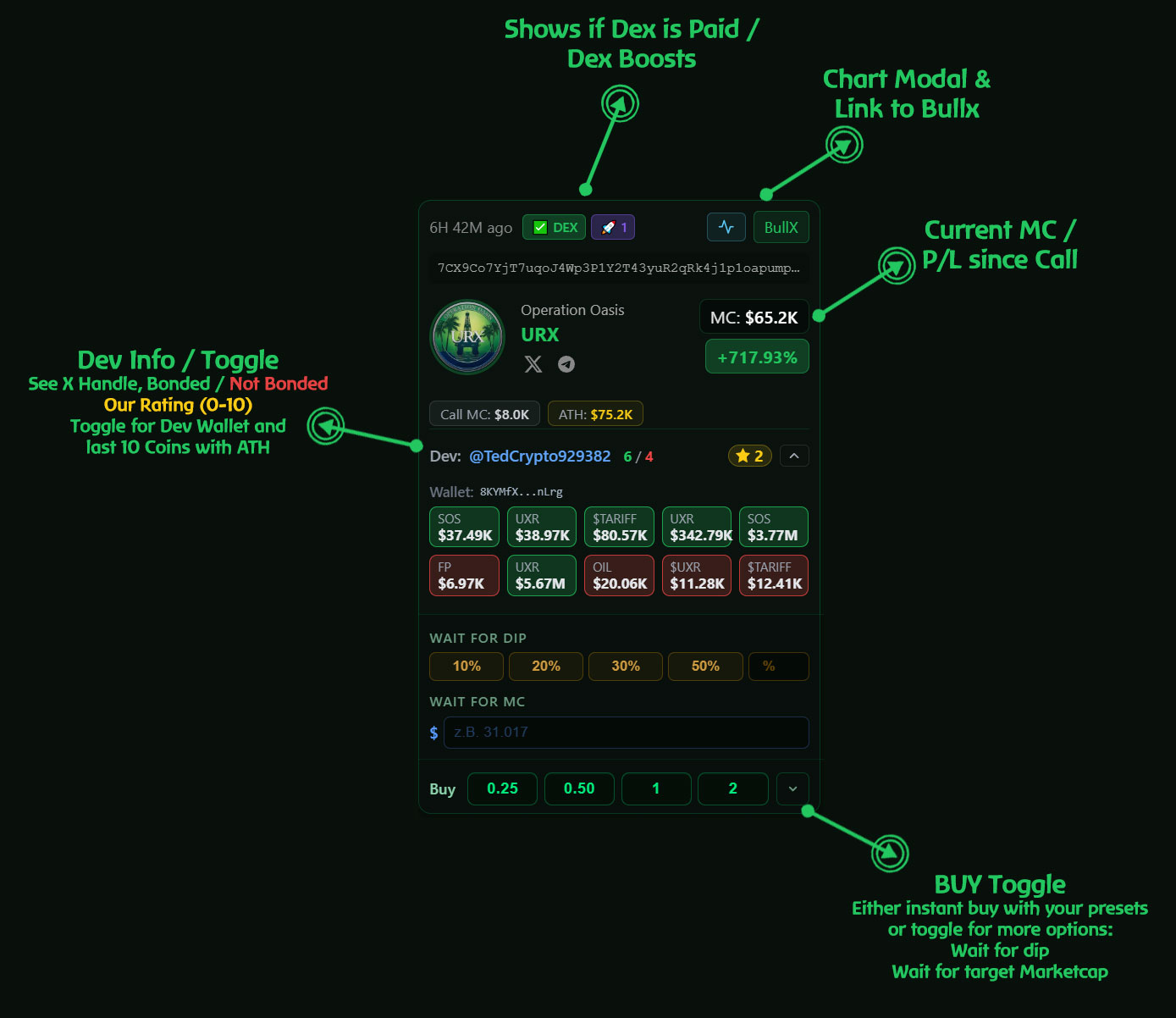
Every call in the feed is displayed as a coin box. Here's what each element means:

Coin Box Explained
Time ago
How long ago the bot detected this coin (e.g. "6H 42M ago").
DEX Badge
✅ DEX = paid listing on DexScreener (verified). DEX without checkmark = not yet paid. WAIT DEX = payment processing.
Boost Badge 🚀
Number of paid boosts on DexScreener. More boosts = higher visibility. No number = no active boosts.
Chart Button
Opens an embedded DexScreener chart in a modal. You can also buy directly from the chart modal using your presets.
BullX Link
Opens the token on BullX for additional charting and analysis.
Token Mint
The full Solana mint address. Click to copy it to your clipboard.
Token Info
Name, symbol, logo and social links (X/Twitter, Telegram, website) when available.
MC (Market Cap)
Current market cap in USD. Updates in real-time.
Profit %
Price change since the bot detected the coin. Green = up, red = down.
Call MC
The market cap at the moment the bot first detected this coin.
ATH
All-Time High market cap since detection. Tracked in real-time.
✦ VERIFIED Badge
Golden border + ribbon. The algorithm has identified this coin as high-quality based on multiple on-chain metrics (holder distribution, buy pressure, volume, age).
🌙 Mooner tag
Marks calls that qualified for the Mooner lane. Auto-Buy for Mooner is configured separately under Settings → Auto-buy.
CTO
Community Takeover — shown on the card when applicable, with live CTO context in the feed. Pairs with the CTO Auto-Buy lane.
Dev Info
Click the arrow to expand: Twitter handle, bonded/not-bonded ratio, dev scoring (star 0-10), wallet address (click to copy), and the last 10 launches with ATH values. Green boxes = bonded (graduated to Raydium). Red boxes = not bonded.

💰 Buy Options

Three ways to enter a trade:

Instant Buy

No option selected — click a buy preset button and the trade executes immediately at the current market price.

Wait for Dip

Select a percentage (10%, 20%, 30%, 50% or custom). The bot waits until the price drops by that percentage from the current MC, then buys automatically.

Wait for Market Cap

Enter a USD target (e.g. $4,000). The bot waits until the market cap falls to that level, then buys. Must be lower than the current MC.

How to use

  1. Click the toggle arrow (˅) next to the buy buttons to reveal the options panel
  2. Choose Wait for Dip (click a % button — it highlights green) or enter a Wait for MC value
  3. The active option appears as a label (e.g. "⏳ Dip 20%")
  4. Now click any buy preset button (0.25, 0.50, 1, 2 SOL) to submit the order with that condition
  5. To switch back to instant buy, click the active dip button again to deselect, or clear the MC field

Where it works

Buy options are available everywhere you buy manually: coin boxes in the feed, the Buy Coin bar, and the chart modal. Auto-Buy uses the same wait for dip % per lane (configured under Settings → Auto-buy).

Note: Pending orders (waiting for dip/MC) appear in your Active Positions as "Pending". You can Skip (buy immediately) or Cancel at any time.

📈 Active Positions

Your open trades are managed automatically by the bot. Here's what you see and can do:

Status
Active = trade is open and managed. Pending = waiting for dip/MC target. Cancelled = you cancelled a pending order. Closed = trade is complete (sold).
Buy / Buy MC / Current MC
Your entry amount in SOL, the market cap at entry, and the current market cap. All in real-time.
Active Position
Current value of your remaining position in SOL (after any partial sells).
Already Sold
Total SOL already realized through partial sells or profit-taking.
Stop MC
The market cap at which your stop loss triggers. This moves up automatically as profit levels are hit.
P&L
Total profit/loss in SOL and percentage. Includes realized sells + current position value.

Action Buttons

Sell All

Immediately sell your entire remaining position at market price.

Skip

For pending orders only. Skip the wait and buy immediately at current price.

Cancel

Cancel a pending order. No trade is executed, no SOL is spent.

PNL

Generate a shareable P&L card image. Download or copy to share your wins.

Details Accordion

Click Details ˅ to expand additional information: entry/current market cap in detail, next profit trigger, next partial sell trigger, DexScreener link, DEX and boost status.

⚙ Settings

Use the tab bar at the top of Settings: Wallet, Buy Presets, Strategy, Auto-buy, History, and TG Bot.

Wallet

  • Wallet Address — Your dedicated SOL wallet. Deposit SOL here to trade in Real mode.
  • Balance — Current SOL balance (refresh to update).
  • Trading Mode — Switch between Demo (virtual SOL) and Real (actual SOL on-chain).
  • Show Private Key — Reveals your wallet's private key. Keep it safe, never share it.
  • Withdraw — Send SOL from your bot wallet to any external address.
  • Fee cashback — Real-mode fee credits and payout to your trading wallet (see on-page totals and rules).
  • Referral — Your invite link and referral stats live here. Eligible referrers earn a share of trading fees from referred users (see Demo vs Real below for the headline rate).
  • Post-launch airdrop — emoX token allocation tied to credited fee cashback; details and caps are shown in this panel.

Buy Presets

Set four custom SOL amounts for the buy buttons on every coin card, the Buy Coin bar, and chart modals. Example: 0.25, 0.50, 1, 2 SOL. Changes apply immediately.

Strategy

The Strategy tab has two sub-tabs:

  • Your Strategy — Strategy Presets: load a built-in profile (Conservative, Balanced, Aggressive, etc.) or save your own. Initial Stop Loss % caps downside. Profit Levels ratchet your stop up as price hits milestones. Partial Sells take profit in slices while keeping a moonbag. Buy / Sell Slippage, Priority Fee, and Jito Tip control execution aggressiveness (Jito overrides priority when set).
  • Simulate Strategies — Back-test against historical verified calls for a chosen period. Pick a saved preset or edit Strategy Parameters (stop, dip wait, profit levels, partials), set buy size, then click Run Simulation. After you tweak anything, click Run Simulation again to re-simulate with the new parameters and compare aggregate and per-coin results. Results are approximate (no live slippage / latency).

Auto-buy

Same screen as in the Auto-Buy section of this help: enable Verified, Mooner coins, CTO coins, and/or Dev wallet snipe; set amount, optional wait for dip, and strategy preset per lane. Save auto-buy persists settings. Remember: auto-buys only fire in Real SOL mode.

History

Trading History — all closed and relevant activity for the current mode, newest first: token, date, size, P&L in SOL and %, filters including auto-buy source where applicable. Totals appear at the top.

TG Bot

Link your Telegram trading bot, configure instant-buy after mint, and preset slots — same account as the web app, parallel to the dashboard.

🔄 Demo vs Real Mode

Demo Mode

  • 10 virtual SOL to start
  • Manual buys, Strategy, and back-test simulation — full practice loop
  • Auto-Buy does not execute in Demo (Real SOL only)
  • No real money at risk
  • Simulated fills with real market data

Real Mode

  • Real SOL on the Solana blockchain
  • Actual transactions, actual profits/losses
  • Deposit SOL to your bot wallet to start
  • Withdraw anytime to any wallet
  • 4-6ms execution latency
Recommendation: Always start in Demo mode. Test your strategy, get familiar with the interface, then switch to Real mode in Settings → Wallet → Trading Mode.
Trading fees (Real mode): We charge a 1% fee per transaction. No fee in Demo mode. Affiliates: If you refer someone, you receive 25% of the transaction fee from their trades, lifetime.

📚 Glossary

ATH
All-Time High — the highest market cap a coin has reached since detection.
Bonded
A token that completed the bonding curve on pump.fun and graduated to Raydium. Indicates the dev followed through.
Boost
Paid promotion on DexScreener. More boosts = more visibility for the token.
Call MC
The market cap at the moment the bot first detected the coin.
DEX Paid
The token is listed and verified on DexScreener (dev paid for the listing).
Dev Score
Our internal rating (0-10) of the developer based on their past launches, bonding history, and behavior patterns.
Moonbag
A small position kept after partial sells for maximum upside. If the coin moons, your moonbag rides the full wave.
Partial Sell
Automatically selling a percentage of your position at a profit target. Locks in gains while keeping exposure.
Priority Fee
Standard Solana fee market priority. Used as fallback when Jito Tip is 0.
Jito Tip
Direct tip to Jito validators (~90% of network) for guaranteed faster block inclusion. Overrides Priority Fee when set. You only pay if your TX lands.
Profit Level
A price milestone where the bot raises your stop loss. Protects gains automatically.
Slippage
The maximum price difference you accept between order and execution. Higher slippage = more likely to fill in volatile markets.
Stop Loss
The price point where the bot automatically sells to limit your loss. Set as a percentage from your entry.
Verified
A coin flagged by our algorithm as high-quality based on on-chain metrics: holder distribution, buy pressure, volume, age, and more.
Mooner
A call that met Mooner qualification rules; shown with a moon tag in the feed and configurable as its own Auto-Buy lane.
CTO
Community Takeover — a call where the community has taken over the token; surfaced in the feed with live CTO context where available.
Auto-Buy lane
An independent switch (Verified, Mooner, CTO, Dev snipe) with its own size, optional dip wait, and strategy preset. Fills are managed like manual trades.
Re-simulate
In Strategy → Simulate Strategies, running Run Simulation again after you change parameters so the back-test reflects your latest rules.
Wait for Dip
A pending buy order that executes only when the price drops by a specified percentage.
Wait for MC
A pending buy order that executes only when the market cap falls to a specified USD value.

PNL Card

PNL card preview

Save Strategy Changes

You've made changes to your strategy. How would you like to save them?

or

Account Not Activated

🔒

Your account is not yet activated

We will notify you via the login bot when you can use emoX.

Thank you for your patience!

Latest Calls — filter modes

All Calls

We already filter out roughly 97% of rugs through our screening algorithm. With 20,000+ new launches per day on-chain, the remaining 3% can still be a large number in absolute terms — so caution is always warranted. Do your own research (DYOR): look up the token, the dev, and the narrative before sizing in.

Filtered Calls

This view only shows calls that meet at least one of:

  • Early verified signals
  • CTO (community takeover) tagged calls
  • Devs whose last 10 prior launches (ATH history) show a bonded rate above 30% (bonded = completed the pump.fun curve)

Your odds of finding profitable setups are meaningfully higher in this lane, but it is not risk-free: in the sub‑$40k market-cap range you can still encounter rugs. This filter is significantly safer than the raw feed — not a guarantee.

Explain this Strategy

Technical overview

emoX — Technical Whitepaper

Why the product exists, how it’s built in principle, and what you should expect — without implementation trivia.

Table of contents

  1. 1. Introduction
    1. 1.1 Pain points
    2. 1.2 Why emoX
  2. 2. Product features
    1. 2.1 Main dashboard
    2. 2.2 Signals & quality layers
    3. 2.3 Settings — Wallet
    4. 2.4 Settings — Buy Presets
    5. 2.5 Settings — History
    6. 2.6 Settings — Referral
    7. 2.7 In-product help & updates
  3. 3. Trading strategies
    1. 3.1 Strategy presets (library)
    2. 3.2 Stop loss
    3. 3.3 Profit levels
    4. 3.4 Partial sells
    5. 3.5 Execution parameters
    6. 3.6 Entry conditions
  4. 4. Telegram trading bot
  5. 5. Scope & positioning
  6. 6. High-level architecture
  7. 7. Demo vs real
  8. 8. Identity & access
  9. 9. Data & privacy
  10. 10. Security posture
  11. 11. Risks & limitations

1. Introduction — the problem traders actually feel

Memecoin and short-horizon trading punish humans twice: speed and emotion. The edge isn’t only “finding the call” — it’s executing a plan when your nervous system wants to do the opposite.

1.1 Pain points

  • FOMO entries — chasing green candles after the move; buying the screenshot, not the setup.
  • Panic exits — closing winners too early or bag-holding losers because hope feels safer than a stop.
  • Revenge trading — one bad tick erases discipline; size and rules go out the window.
  • No plan, or a plan you won’t follow — you “know” stops matter until the first wick.
  • Attention bankruptcy — hundreds of tabs, five Discords, zero consistent playbook.
  • Sleep & life — runners don’t care about your timezone; manual management doesn’t scale.
  • Inconsistent sizing — the same conviction gets 0.2 SOL once and 3 SOL the next time because mood changed.

1.2 Why emoX

  • Emotionless execution — once you define risk and strategy, the system follows rules — not adrenaline.
  • Innovative trading logic — structured stop management, staged profit-taking, and moonbag-style retention so you’re not binary “all in / all out”.
  • Preset discipline — buy sizes and conditions you choose in advance; fewer impulsive clicks.
  • Full lifecycle automation — from entry triggers through exits; the bot carries the plan while you stay human.
  • Practice without paying tuition — demo mode to internalize the workflow before real SOL.
  • One account, multiple surfaces — web desk for depth, optional mobile-style flow when you’re away from the chart.

emoX is not a promise of profit. Markets are adversarial. The goal is process integrity: consistent rules, measurable risk, and automation that doesn’t negotiate with fear.

2. Product features — overview

emoX is a Solana-focused trading desk for memecoin-style flows: live calls, dev intelligence, and fully automated trade management after you enter. Below is how the product is organized in the app today (names match the UI).

2.1 Main dashboard (after login)

  • Active Positions — Open trades with live-style cards: entry vs. current market cap, P&L, DEX/boost hints, expandable details, chart shortcuts, and actions aligned with your mode (demo vs real).
  • Dev Launches — Feed oriented around developer history and bonding patterns so you can filter for setups that match your risk appetite.
  • Latest Calls & Winner Calls — Ongoing call stream plus performance-oriented views to study what worked in the past (not a guarantee for the future).
  • Buy Coin (mint bar) — Paste any Solana token mint for a preview card, optional inline chart, and the same buy-preset + conditional entry tools as on call cards.

2.2 Signals & quality layers

  • Verified / curated signals — Higher-confidence lane for calls that pass internal quality gates (automation-assisted screening).
  • ML-enhanced call scoring — Where enabled, models rank or highlight opportunities using historical and on-chain style features; you still choose entries and sizing.

2.3 Settings — Wallet

  • Demo vs Real SOL — Single explicit switch: demo uses play balances and simulated lifecycle; real uses your linked wallet path for actual execution.
  • Balance & wallet status — Shown in-header when authenticated; real mode requires a properly linked wallet as described in-product.

2.4 Settings — Buy Presets

  • Configure four SOL amounts (buttons #1–#4) used everywhere: call cards, buy-coin bar, and the Telegram bot’s instant-buy slot.
  • Changing presets updates all surfaces after save — one source of truth for sizing discipline.

2.5 Settings — History

  • Per-mode trade history with summaries (e.g. win rate, totals) so you can review behaviour without exporting spreadsheets first.

2.6 Settings — Referral

  • Referral mechanics for users who onboard others, as configured for your account tier (details in-app).

2.7 In-product help & updates

  • How-to / documentation — Embedded guide covering workflow, strategy concepts, and UI map.
  • Changelog & news — Public updates list (also linked from the landing roadmap) so you can see what shipped recently.

3. Trading strategies — concepts & configuration

The Strategy tab is where you define how the bot manages a position after entry. Everything is saved server-side and applied to new trades according to your mode. You can work in three ways: load a strategy preset, start from a preset and tweak, or build a fully custom configuration and optionally save it as your own named preset.

3.1 Strategy presets (library)

Pre-built profiles (e.g. conservative → aggressive) encode different balances of risk, take-profit spacing, and stop behaviour. Use Load to preview the parameters in the form, or Load & Save to apply immediately. Custom user presets let you name, describe, and reuse your own combinations; you can delete your custom presets when you no longer need them.

3.2 Stop loss

You set a maximum drawdown from entry (typically as a percentage of market cap / position thesis). If price violates that floor, the system is designed to exit the position automatically — removing the “just one more candle” negotiation with yourself.

3.3 Profit levels (staged upside)

Profit levels define multiples of your entry reference (e.g. market-cap multiples) where the strategy tightens risk — think of it as locking in progress as the trade works. Each level can specify a trigger (when the level becomes active) and a stop upgrade (where the protective floor moves to once that trigger is hit). In practice this implements a ratcheting stop: as the token runs, your downside floor walks up instead of staying at the original wide stop.

3.4 Partial sells (scaling out)

Partial sells let you take a defined percentage of the remaining position off the table at configured multiples — classic staged de-risking while keeping a moonbag working for tail scenarios. Together with profit levels, this avoids a binary “sell all or hold all” emotional trap.

3.5 Execution parameters

  • Slippage tolerance — Maximum acceptable execution drift vs. intended price; higher can improve fill probability in fast markets but increases cost risk.
  • Priority fee — Solana-style prioritization budget so transactions compete better under congestion (still no guarantee of inclusion).

3.6 Entry conditions (per buy, not only strategy)

On call cards and the buy-coin bar, you can attach conditional entries before tapping a preset:

  • Wait for dip — Buy only after price pulls back by a chosen % from the reference (preset chips plus optional custom %).
  • Wait for market cap — Buy only when USD market cap crosses a target you type (useful for “only if it proves volume” style rules).

These conditions are orthogonal to strategy: they gate when the bot opens; strategy governs how it manages the position once open.

4. Telegram trading bot (second surface)

emoX ships a dedicated Telegram trading bot tied to the same account as the web app (same Telegram identity). It is meant for parallel use: keep the full dashboard on desktop while you fire entries or check state from your phone.

  • Mint-first workflow — Send a Solana mint address; the bot responds with contextual actions (buy sizes, refresh, menu) instead of forcing you to re-type commands.
  • Instant buy — Optional mode: after a mint, the bot can submit immediately using one of your four web-configured buy presets (slot #1–#4 chosen in Settings → TG Bot).
  • Demo / real parity — The bot does not maintain a separate “paper account”; it follows the same demo vs real mode you set under Settings → Wallet on the web.
  • Positions & status — Inline panels to list open positions, refresh cards, and view high-level account/trading status without opening the browser.
  • Verified calls — When broadcast, high-signal calls can arrive as structured cards with the same buy / dismiss patterns as the product philosophy (no blind auto-buy on verified unless product policy explicitly enables it — see live UI).

Strategy parameters (stops, profit ladder, partials, slippage, fees) remain edited in the web Strategy tab; the bot consumes those saved settings for execution.

5. Scope & positioning

emoX is an automation layer for traders who want repeatable execution on Solana memecoin-style opportunities: signals, optional quality filters, user-defined risk, and hands-off management after entry. It is not a replacement for doing your own research or accepting that all speculative trading can go to zero.

6. High-level architecture

A browser client talks to a dedicated backend over authenticated APIs. The backend owns persistence (accounts, settings, positions), orchestration of trades, and integration with market and chain data through internal services — abstracted so the client never sees keys or raw vendor wiring. The Telegram bot uses the same backend and identity model; message actions map to the same trading engine rules as the web UI.

7. Demo vs real

Demo uses simulated balances and trade lifecycle for learning and strategy validation. Real mode routes to user-linked on-chain execution paths configured in product settings. Mode is explicit; we recommend proving the playbook in demo first.

8. Identity & access

Access is tied to a verified identity provider flow (e.g. Telegram login) mapped to a server-side account. Sessions and authorization are enforced server-side; the UI never holds signing keys for real execution in the browser.

9. Data & privacy (principles)

Operational data is stored to run the product: account, settings, trade history, and logs needed for support and security. We do not publish a trader’s full strategy as marketing. Retention and regional privacy obligations are described in the legal pages, not in this technical summary.

10. Security posture (summary)

  • TLS for transport; secrets and credentials live server-side.
  • Least-privilege access to user-scoped resources.
  • No custody claims beyond what the product actually implements — see wallet documentation in-app.

11. Risks & limitations

  • Slippage, failed transactions, RPC congestion, and exchange/DEX behaviour can alter fills vs. intent.
  • Automation reduces emotional error but not market risk; you can still lose the full amount risked.
  • Past performance of signals, verified lanes, or ML scoring does not guarantee future results.
  • Third-party clients (e.g. Telegram) have their own availability and security considerations; use official links from the authenticated web app only.
Document version 1.2 · For orientation only; product behaviour is defined by the live app and terms. Low-level vendor integrations are intentionally omitted here.

Changelog & News

Latest updates from emoX — newest first

Loading updates…
No news posted yet. Check back soon.